 |
|
More Related Stories |
 |

From: $1,129  |
|
Surya Area Rugs Artist Studio Collection
Surya Area Rugs Artist Studio Collection ART-60 ...
From: $129 |
|
Lee Middleton Original Dolls Artist Studio Collection - Picture Day
Artist: Reva Schick.
From: $135 |
| Page (1) of 1 - 12/27/05 |
 email article email article |
 print
page print
page |
The brushes
This latest collection of brushes for Studio Artist includes 25 individual presets in a variety of categories. In general, most could be categorized as chalk-like brushes, though they're not designed to be natural media emulators. Rather, they're designed to be used to build up images slowly with rich, rough textures. Categories in this collection include Soft, Grainy, Lumpy, Furry, Chunky and Chalk. There are also four "wet" brushes that apply like acrylic paint and have the effect of blending with color on the canvas.
All of these brushes are fully dynamic and are suitable for use with any Wacom graphics tablet. (See below for information on modifying parameters.) They're also designed primarily to be used on transparent layers with alpha enabled. We have a series on working with alpha channels in Studio Artist, which you can find by clicking here.
Here's a look at some of the brushes included in this collection. Most of these examples were drawn with several short, choppy strokes, applied over one another to build up the color and texture. (Note that these brushes, with their current settings, are not good for automatic rotoscoping; they're designed primarily for drawing images from scratch.)
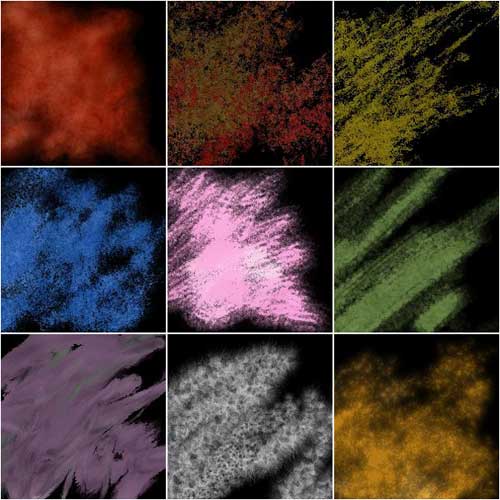
These brushes are, in order from left to right, top to bottom: Soft Brush 1, Clumpy 1, Clumpy 2, Grainy 2, Chalk 1, Chalk 6, Creamy 1, Furry 1 and Lumpy 1.
Download, installation and usage
This collection of paint patches is designed for Synthetik Studio Artist, a Macintosh-only program that runs on Mac OS X and Mac OS 9. These brushes will function properly in version 3.0 or higher.
Download: Nagel Series 15 Paint Patches (204 KB)
The collection is compressed in a .zip archive. Click the download link below, then expand the archive (NagelSeries1.zip), and you'll be left with a folder called NagelSeries15, which contains the 25 individual brushes.
To install the paint patches, move the NagelSeries15 folder to the following directory: /Studio Artist 3.0/Preset/ Default/.
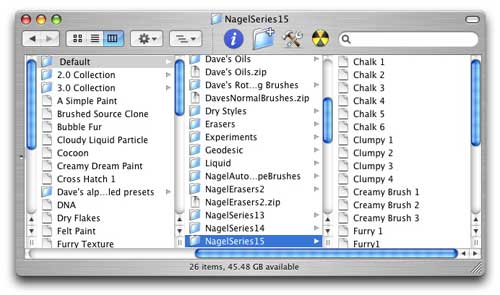
Now launch Studio Artist. In the panel on the left of the interface, you'll see a list of available presets. Click on the "Category" pull-down menu, and select NagelSeries15.
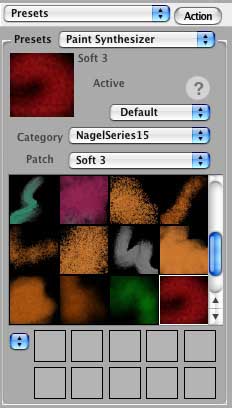
Then simply click on a brush and start drawing.
These particular brushes are geared toward working on a transparent canvas and building up color and texture slowly. If you do not work with alpha enabled on your layers, you'll likely see quite a bit of fringing on these brushes. However, you can reduce this effect somewhat by going into the Paint Synthesizer and playing around with the various blend modes available.
To do this, in the pull-down menu next to the Action button in the left-hand panel, select Paint Synthesizer. Then go to the Paint Fill Apply category. For the Composite parameter, choose "Alpha" from the pull-down menu. (There are many other composite modes available for you to choose from if Alpha doesn't work out for you.)
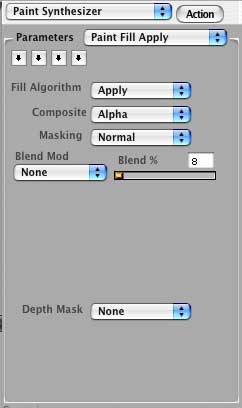
Beyond this, there are several other ways you might want to alter these brushes for your own personal use. Here are some quick pointers for where to go within the Paint Synthesizer to make changes that I think most people will want to make.
Brush Size: This is located in the Brush Source parameter. You can adjust the horizontal and vertical scale to resize the brush.
Brush Size Dynamics: You can change the modulation of a brush by going into the Brush Modulation parameter. Here you can choose things like pressure or tilt to modulate the scale of any given brush. The "# Sizes" option lets you assign the actual number of sizes that the paint patch generates when you vary pen pressure or tilt on the canvas.
Speed Improvements: If your brush is drawing too slowly for your tastes, there are three principal changes you can make to a preset to speed up its performance a bit. The first is to go into Path Randomize and set the Displace value to "None." This will affect the appearance of the brush in many cases, but usually not too severely (at least in the case of the current collection). The second is to go into Brush Modulation and decrease the "# Sizes" value. The fewer brush size stages Studio Artist has to calculate, the faster it will apply the brushes. And the third relates just to some of the brushes in this collection. In general, I like to build up and tear down images slowly, so I like to keep the blend settings low, allowing me time to get a feel for what's showing up on the canvas. You can increase the blend percentage upward in order to apply solid color more quickly. This setting is located in the Paint Fill Apply parameter.
Color Randomization: You may or may not like your applied colors to be randomized. You can adjust the randomization of source color in the Paint Color Source parameter. The Randomize setting adjusts the amount of randomization, while the Offset value adjusts the distance from the original color to the color applied on the canvas. You can also adjust the Recursive Source Blend settings to affect the way the color is applied to the canvas. In addition, the modulation of paint colors can be adjusted in the Paint Color Modulate parameter.
Brush Texture: Some of the brushes in this collection are heavily textures, and you might want to customize the texture to suit your own needs. In the case of this collection, much of the texture comes from the randomization of the brush nib itself. You can adjust this in two places. In the Brush Source parameter, you can adjust the nib texture by changing the Random Type and the various other randomization parameters. You'll see the changes to the nib as you make changes to these values. The second place to make texture changes is in the Brush Type parameter. Here you can change the algorithm, the bias, the gain and several other settings that affect the look of the brush.
If you interested in finding out how other parameters affect the look of your brush, be sure to check out our various guides to using Studio Artist's Paint Synthesizer, which you can find by clicking here.
Once you make changes, you can use the brushes immediate or export them so that the changes will be permanent. (Brushes default to their saved values whenever you click on a preset.) To export your modified presets, choose File > Export > Paint Patch Export. Select a folder within the Default folder as the destination for your new brushes. The next time you reload your presets (Edit > Preset > Reload Presets) or relaunch Studio Artist, the modified brushes will be available to you in the Presets panel.
And that's it. If you have any questions about Studio Artist, be sure to visit me in the Synthetik Studio Artist forum here at DMN Forums by clicking here.
And remember, as always, that we have tons of downloads available for Studio Artist, as well as programs like Adobe Photoshop, Corel Painter and many others. You can find those by clicking here.
 If you liked this article
click here to recommend it.
Page: 1
If you liked this article
click here to recommend it.
Page: 1
Related Sites: Creative Mac , Digital Producer , Audio Video Producer , Corporate Media News , Digital Media Designer , Oceania , MacDesignPro
Related Newsletter: DMN Newsletter , Pixels Newsletter , Mac Alert Newsletter , Digital Media Net , DMNForums
To Comment on This Article, Click HERE
Most Recent Reader Comments:
Click Here To Read All Posts
Must be Registered to Respond (Free Registration!!!, CLICK HERE)
Digital favorites
- Casino Online Non Aams
- Betting Sites UK
- Casino UK Sites
- Casino Online Non Aams
- Casino Non Aams
- Casinos Not On Gamstop
- UK Online Casinos Not On Gamstop
- Meilleur Casino En Ligne
- Crypto Casinos
- Casino Online Italia
- Migliori Giochi Casino Online
- Meilleur Casino En Ligne Français
- Casino En Ligne
- Meilleur Casino En Ligne Francais
- Siti Scommesse Non Aams
- Siti Poker Online Migliori
- Meilleur Site De Poker
- Site De Paris Sportif Nouveau
- Sweet Bonanza Fruits Avis
- Parier Sur Ufc
- Fm카지노 가입코드
- 비트코인 스포츠베팅
- Casino Jeux En Ligne
- Sites De Paris Sportifs
- Casino En Ligne Argent Réel
- Cresus Casino Avis
- Migliore Casino Non Aams
- Meilleur Casino En Ligne
- Meilleur Casino En Ligne 2026
- Casino En Ligne Fiable
- Casino En Ligne
- Migliori Casino Crypto
- Bonus Free Spin Senza Deposito
- Casino Online Non Aams Sicuri
- Migliori Siti Scommesse Non Aams
- Meilleur Casino En Ligne De France
- Casino En Ligne
- Casino En Ligne Fiable
- Trusted Online Casino Malaysia
- Nouveau Casino En Ligne 2026
- オンラインポーカー
- Casino En Ligne Cashlib
Source:Digital Media Online.
All Rights Reserved


