 |
|
More Related Stories |
 |
|
From: $62 to $90  |
|
Huey T-Shirt Grey by Xyience
From: $18 |
|
BLACK DIAMOND Duffles - Baby Huey - BLACK/GREY
Huey Duffles are super weatherproof and durable ca...
From: $99 |
| Page (1) of 2 - 01/17/06 |
 email article email article |
 print
page print
page |
 Summary: The Huey is one of the first products of the new collaboration between Pantone and GretagMacbeth, two companies well known for their efforts to bring accurate color to the desktop. The Huey is something of a milestone in color accuracy in that it offers both consistent calibration for any type of monitor and constant monitoring of ambient light, adjusting the colors on the display to complement current lighting conditions. And it comes in at an irresistible price of $89, leaving no excuse for anyone to keep working with bad color.
Manufacturer: Pantone/GretagMacbeth (http://www.pantone.com)
Platform: Mac OS X and Windows
Price: $89
Users: At this price point, the Huey is targeted toward home users, but it's also great for graphic designers, amateur photographers and essentially anyone else who works in the visual arts.
Recommendation: Strong Buy
For those just getting into digital imaging, color management can be a confusing issue. But let me try to simplify it. Different devices all handle color differently. The picture you see on your camera's LCD is going to look different from the same picture displayed on your computer monitor, which is going to look extremely different from how the picture looks when it comes out of your printer. But there are ways to minimize these differences, thus saving you money on the ridiculously expensive ink you would otherwise waste whenever you print something that comes out wrong.
The way to minimize the bulk of your color problems is by calibrating your monitor with one of the calibration tools on the market. And for beginners--and even professional users in many cases--a good solution for this is the brand new Huey from Pantone/GretagMacbeth.
The Huey, introduced just this week, is one of the first products of the new collaboration between Pantone and GretagMacbeth, two companies well known for their efforts to bring accurate color to the desktop. The Huey is something of a milestone in color accuracy in that it offers both consistent calibration for any type of monitor and constant monitoring of ambient light, adjusting the colors on the display to complement current lighting conditions. What's more, it comes in at an irresistible price of $89, leaving no excuse for anyone to keep working with bad color.
For those of you who are unsure as to why you'd need to calibrate your monitor at all, let me give you a little background.
A little background for beginners
One of the perceptions is that when you buy a new printer, a new camera, a new monitor and a new computer, all of these things will somehow just work together in perfect harmony. But that's almost never the case. Tons of factors--from the color profile in your camera to the type of paper you use to print out your photo--in some way impact the color workflow. But perhaps the one factor that's the most significant in this workflow is the way your monitor displays color. And, in general, the one thing you can count on about your monitor is that it's displaying color wrong.
Here's what I mean by that. Your camera, computer and printer are all more or less communicating color to one another through a color management system, such as Apple's ColorSync on the Mac. ColorSync compares the properties of your various devices and passes color information on down the line--from camera to image editing software to page layout software to the printer.
However, there's a weak point in this flow of information. ColorSync can only pass correct information to a printer if it has correct information to begin with. But no two monitors display color in the same way, so what you're seeing on screen is probably not what your computer assumes you're seeing. Something that looks pale green on your screen may come out yellow in the final print for the simple reason that what ColorSync understands as yellow is displaying incorrectly as pale green on your screen. Even if you have two monitors that are the same model, variations that occur in manufacturing and/or handling can cause differences in the displays. And even if your monitor is factory-calibrated, it doesn't mean it's going to be calibrated when it gets to you. And it certainly doesn't mean it's going to stay calibrated. Your display's color drifts over time, which means that, if left unattended, it's going to lose whatever fidelity it had when it came from the factory. And we're not talking about years here. We're talking about weeks for a monitor to drift out of its properly calibrated state. Usually this drift is imperceptible, which, in fact, makes it even more dangerous for the simple reason that it's hard for you to know when you're working with bad color and when you're not.
And that's why all professional designers and photographers use monitor calibrators. Mind you, they don't rely solely on their perfectly calibrated displays; they'll also shell out tons of cash on match prints to make sure their prints are going to come out right. But it all starts with a properly calibrated monitor.
Now, if you're not a professional designer or photographer, obviously you have less to lose than those folks if one of your family photos comes out too dark or too orange or whatever. But the costs do add up, and they add up quickly. Remember, in many cases, the replacement ink for your printer is more expensive than the printer itself. And each time you make a bad print, you're throwing away a couple dollars in ink and photo-quality paper. And that means that very quickly you're going to justify the price of a calibration device that will help you minimize wasted ink and paper.
All of this is very simplified, of course, but the basic message is that if what you see on screen is inaccurate (which it is), then what you get out of your printer is going to be inaccurate as well. A calibrator is going to help make your monitor more accurate, and that, in turn, is going to give you prints that more closely resemble what you see on screen.
The Huey calbration system: hardware and software
Now, one of the latest additions to the field of color calibration tools on the market is the new Huey from Pantone/GretagMacbeth. This is a consumer-level calibrator, but don't let this monicker fool you. The Huey is the descendant of GretagMacbeth's professional tools, packaged in a dinky form factor and driven by a simple, wizard-like calibration utility. The principal differences between this calibrator and the higher-end models also introduced by Pantone/GretagMacbeth this week (Eye-One Display LT and Eye-One Display 2) are in the software.
In terms of hardware, the Huey comes with a USB-based colorimeter, a USB cable extender and a stand. The colorimeter itself is distinguished from previous Pantone-branded colorimeters in several respects.
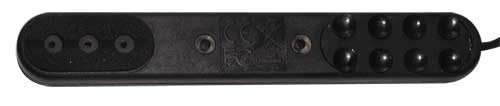
First, it's dinky, measuring about four inches in length and bearing the girth of a felt-tip marker. And it weighs almost nothing. On the back of the unit, you'll find the sensors that are used in the calibration of your monitor, as well as eight tiny suction cups for holding the device in place during calibration. The colorimeter can be used on LCD and CRT displays with no additional hardware (such as a baffle) required.
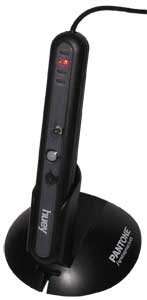
On the front of the display are the LEDs that indicate activity and that are also used to measure the level of ambient light in the work area. The stand holds the Huey when it's not being used to calibrate a display. In this stand, the Huey can be positioned and angled to match the position and angle of your display--helpful, of course, if you intend to leave the Huey plugged in all the time so that it's continuously measuring ambient light and adjusting your display accordingly.
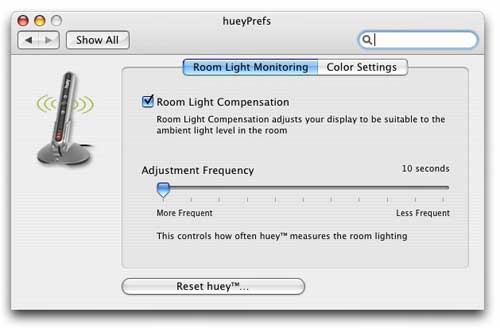
This is, by the way, the first consumer-level colorimeter I've seen with a built-in ambient light sensor, and I think it's a fantastic addition to the product. Using the software provided (which we'll get to below), you can set the Huey to measure ambient light from anything from every 10 seconds to every four hours. (You can also shut this off entirely, if desired). Whenever it takes a reading, Huey will adjust the display so that the colors you perceive on screen remain fairly consistent regardless of lighting conditions.
Incidentally, Huey is powered through the USB bus, so there are no batteries or power cables to worry about.
Related Sites: Creative Mac , Digital Producer , Audio Video Producer , Corporate Media News , Digital Media Designer , Oceania , MacDesignPro , Consumer Electronics Net , Photography (CE)
Related Newsletter: DMN Newsletter , Pixels Newsletter , Digital Media Net , DMNForums , Gadgets Newsletter , Review Seeker
To Comment on This Article, Click HERE
Most Recent Reader Comments:
Click Here To Read All Posts
Must be Registered to Respond (Free Registration!!!, CLICK HERE)
Digital favorites
- Casino Online Non Aams
- Betting Sites UK
- Casino UK Sites
- Casino Online Non Aams
- Casino Non Aams
- Casinos Not On Gamstop
- UK Online Casinos Not On Gamstop
- Meilleur Casino En Ligne
- Crypto Casinos
- Casino Online Italia
- Migliori Giochi Casino Online
- Meilleur Casino En Ligne Français
- Casino En Ligne
- Meilleur Casino En Ligne Francais
- Siti Scommesse Non Aams
- Siti Poker Online Migliori
- Meilleur Site De Poker
- Site De Paris Sportif Nouveau
- Sweet Bonanza Fruits Avis
- Parier Sur Ufc
- Fm카지노 가입코드
- 비트코인 스포츠베팅
- Casino Jeux En Ligne
- Sites De Paris Sportifs
- Casino En Ligne Argent Réel
- Cresus Casino Avis
- Migliore Casino Non Aams
- Meilleur Casino En Ligne
- Meilleur Casino En Ligne 2026
- Casino En Ligne Fiable
- Casino En Ligne
- Migliori Casino Crypto
- Bonus Free Spin Senza Deposito
- Casino Online Non Aams Sicuri
- Migliori Siti Scommesse Non Aams
- Meilleur Casino En Ligne De France
- Casino En Ligne
- Casino En Ligne Fiable
- Trusted Online Casino Malaysia
- Nouveau Casino En Ligne 2026
- オンラインポーカー
- Casino En Ligne Cashlib
Source:Digital Media Online.
All Rights Reserved


