 |
|
More Related Stories |
| Page (1) of 3 - 01/17/06 |
 email article email article |
 print
page print
page |
Summary: Path Finder 4 is, quite simply, the Finder Apple should be shipping with OS X. Version 4 has been completely rewritten, and offers unsurpassed functionality for Mac file management.
Manufacturer: Cocoatech (http://www.cocoatech.com/)
Platform: Mac OS X (PPC-only, Universal Binary not yet announced as of this writing)
Price: Free 21-day trial, $34.95 for the full version, $17.95 for upgrades from version 3 (free upgrade if version 3 was purchased after September 29, 2004)
Users: All Mac users, especially those who dislike the Finder
Recommendation: Must Buy
Let me put this as succinctly as I can: if you use a Mac, you need to be using Path Finder 4. Period. That's about as direct as it gets. Granted, $34.95 may seem a bit steep just to replace a part of Mac OS X, but with the native Finder as (arguably) bad as it is and with Path Finder 4 as good as it is, the price is a pittance, especially in light of the sheer volume of features Path Finder 4 packs under the hood.
Why?
This may be an odd application to review, since Path Finder is about as far away from a creative-focused program as you can get. It's a utility, plain and simple, and one that exists to provide functionality in the fast-paced, rock 'n roll world of file management. So what's the value to creative types? One answer is that the native Finder is wholly inadequate. It's slow, clunky, and gets in your way, which is the very antithesis of the Mac experience. In fact, I would argue that Spotlight was borne of an attempt to change the typical file management model to something that doesn't make the Finder look as terrible as it is, rather than fixing the Finder alongside the introduction of Spotlight. But another answer to the value question is probably closer to this explanation (at least to me): Path Finder offers the same value to creatives that Mac OS X itself does in that it's fairly simple and elegant, yet it puts extraordinary power right at your fingertips when the time comes to dig a little deeper. And when you consider how important file management is to any system, and then factor in just how outdated and inadequate the native Mac OS Finder is for many people (do you sense a theme here?), Path Finder becomes more than just a utilityit's an essential tool for basic Mac operation. And if you value organization on your system, the decision to use Path Finder 4 is very much a no-brainer.
Now, there are so many features sandwiched into Path Finder that I couldn't possibly hit on everything, so I'm going to call out some of the features (new or otherwise) that should paint a relatively complete picture of what Path Finder can do. Even so, I'm going to touch on a lot of items, so I'm going to dispense with actual paragraph creation and break out the "quick hit" lists, separated into categories, in the interest of getting us out of here before 2006 isn't a "new" year anymore. Ready? Good. Here we go:
General notes
First, a pair of brief topics before we really get into the meat of the program:
Tiger-only. One of the reasons for the incredibly long delay in the release of Path Finder 4 (which was announced back in 2004) was the decision to make PF4 a Tiger-only application. While the wait was long, and pre-Tiger folks are likely still miffed at being given the virtual finger, the decision has paid off. The "maybe it's there, maybe it's not" screen update latency is long gone, replaced by lightning-quick operation on just about every level. Plus, PF4 is much more viable as a true Finder replacement, which we'll discuss just a bit later on.
Easy on the eyes. I just had to mention that PF4 looks fantastic (fig. 1). Tiger-only means the Unified theme is in the hizzy (though Brushed Metal is still around for those who aren't ashamed to kick it old-school), and PF4 adds "superfluous visual effects" (Cocoatech's term) for things like moving files to the Trash.
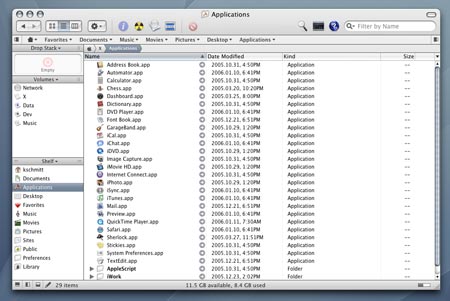
Figure 1: Lookin' good, Mister Kot-tayre.
Flexibility
One of Path Finder's strengths is the different ways you can do things and the various preferences you can set to have it adapt to your working style (as opposed to the big "you get what you get" the Finder seems to scream at you). Here are a few examples:
Tabs! Tabs are easily the star of the show in PF4, and since the concept has been around for a while in various browsers, I think I can dispense with the description (fig. 2). However, it is worth mentioning how much better file management is without oodles of windows cluttering up the screen. Tabs run deep in PF4, as we'll see in a bit when we get to the Bookmarks Bar.

Figure 2: Tabsthey're not just for Web browsers anymore.
Smart Sorting. This is a holdover from version 3, but since it addresses a glaring problem in the Finder, it gets a mention. I'm partial to the Column view, and the Finder gives you exactly zero options for how files get sorted in that particular view. Path Finder fixes that issue, giving you the ability to sort a folder by file type first and then by name (fig. 3). So, in effect, you can browse in Column view but sort files like List view, a feature I've been waiting for the Finder to have since the Mac OS X public beta (that's September 2000, for those who remember that far back). Of course, Smart Sorting also works in all views (including the Desktop).
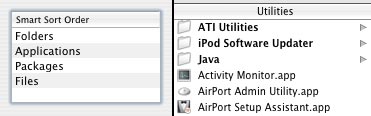
Figure 3: Set the preference (left), and the Column view sorts itself.
The Bookmarks Bar. In another example of Browser meets File Management, PF4 adds a very Safari-esque Bookmarks Bar, onto which you can drag folders, applications, or documents. Folders are the most fun, though, because you can browse entire directories from the Bookmarks Bar and, when you get to where you want to go, open subfolders in tabs (fig. 4). Awesome.
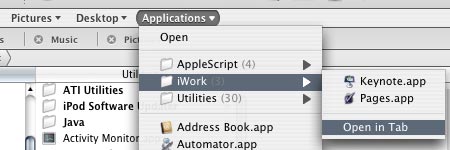
Figure 4: More creamy tab goodness, courtesy of the Bookmarks Bar.
The Contextual Menu. Another not-exactly-new feature, but one that fits in well with the whole flexibility theme of this section, is the configurable contextual menu. PF4 not only lets you build your own right-click menu (fig. 5), but also lets you do the same for the Actions button located on the toolbar. Throw the ability to append third-party contextual menu items from the regular Finder into the mix, and you're good to go.
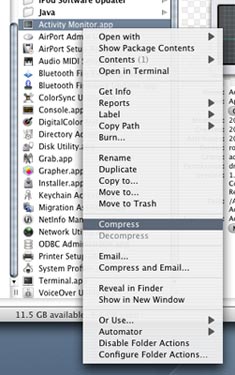
Figure 5
Related Sites: Creative Mac , Digital Producer , Audio Video Producer , Digital Media Designer , Oceania , MacDesignPro , Consumer Electronics Net , HomeOffice (CE)
Related Newsletter: DMN Newsletter , Pixels Newsletter , Mac Alert Newsletter , Digital Media Net , DMNForums , Gadgets Newsletter , Review Seeker
To Comment on This Article, Click HERE
Most Recent Reader Comments:
Click Here To Read All Posts
Must be Registered to Respond (Free Registration!!!, CLICK HERE)
Digital favorites
- Casino Online Non Aams
- Betting Sites UK
- Casino UK Sites
- Casino Online Non Aams
- Casino Non Aams
- Casinos Not On Gamstop
- UK Online Casinos Not On Gamstop
- Meilleur Casino En Ligne
- Crypto Casinos
- Casino Online Italia
- Migliori Giochi Casino Online
- Meilleur Casino En Ligne Français
- Casino En Ligne
- Meilleur Casino En Ligne Francais
- Siti Scommesse Non Aams
- Siti Poker Online Migliori
- Meilleur Site De Poker
- Site De Paris Sportif Nouveau
- Sweet Bonanza Fruits Avis
- Parier Sur Ufc
- Fm카지노 가입코드
- 비트코인 스포츠베팅
- Casino Jeux En Ligne
- Sites De Paris Sportifs
- Casino En Ligne Argent Réel
- Cresus Casino Avis
- Migliore Casino Non Aams
- Meilleur Casino En Ligne
- Meilleur Casino En Ligne 2026
- Casino En Ligne Fiable
- Casino En Ligne
- Migliori Casino Crypto
- Bonus Free Spin Senza Deposito
- Casino Online Non Aams Sicuri
- Migliori Siti Scommesse Non Aams
- Meilleur Casino En Ligne De France
- Casino En Ligne
- Casino En Ligne Fiable
- Trusted Online Casino Malaysia
- Nouveau Casino En Ligne 2026
- オンラインポーカー
- Casino En Ligne Cashlib


