 |
|
More Related Stories |
 |
|
From: $262 to $287  |
|
RJS inspector 3000 verifier with 10 mil aperture, visible red
Inspector 3000 Inspector 3000, ANSI code verifier,...
From: $942 to $1,099 |
|
INSPECTOR 3000 VERIFIER WITH 10 MIL APERTURE, VISIBLE RED
From: $1,012 |
| Page (1) of 4 - 01/25/06 |
 email article email article |
 print
page print
page |
 Summary: Aperture 1.0 is Apple's first application targeted specifically toward professional photographers, particularly those working with raw camera images. Its principal selling points are rapid import of raw image files and fast, non-destructive editing. It is not, as Apple claims, an "all-in-one post-production tool for photographers." It lets you open and organize images and manipulate them in some limited ways, but it does not offer any compositing features whatsoever; it has very few built-in effects (and no support for third-party plugins); it does not have a curve editor (just an enhanced levels editor); its histogram display isn't terribly accurate; it doesn't respect layers in Photoshop files; its output isn't all that fantastic; and it's very sensitive to the hardware you're using, leading, in my case, to the incorrect display of some images. On the whole, it seems that Aperture is useful primarily for the organization of images, and I can't see in that the justification for the $500 price tag.
 Publisher: Apple (http://www.apple.com)
Platform: Mac OS X
Price: $499
Users: Professional photographers
Recommendation: Don't Buy
The first time I saw Apple's Aperture 1.0 in action, I couldn't wait to get my own copy and dig into it. Its looks were gorgeous, and it was blazingly fast at opening and manipulating raw files. With Apple touting Aperture as "the first all-in-one post-production tool for photographers," my expectations were high. Sadly, Aperture did not live up to those expectations.
Now, I know that this is version 1 software, and I also know that every single one of Apple's pro applications made their way gradually up from mediocrity to industry standards, and so Aperture has the same potential as, say, Final Cut Pro or DVD Studio Pro to become, eventually, a critical tool for the market it serves. But I'm not reviewing Aperture's future; I'm reviewing Aperture 1.0.1--the version Apple expects you to spend $500 on now. And my conclusion is this: I can understand why people would want to buy it, but I can't imagine anyone being thoroughly happy with their decision after they've had a chance to use it. If it works for you, more power to you. It doesn't work for me.
So what, you might well ask, are my specific problems with Aperture? Some of them have to do with the way some of Aperture's features have been implemented; some have to do with clearly missed opportunities to make this a thoroughly useful tool for photographers. We'll break these down below and also look at what Aperture does have going for it: speed and ease of use.
First off, let's look at what Aperture has to offer.
Performance/stability
The first major positive in Aperture's favor is its performance. This software is just plain fast at opening and handling large images, including raw files. I've tested this software on both a dual 2.0 GHz G5 and a G5 Quad, and, on both systems, the speed at which Aperture works with large files in insane. On a dual 2.0 GHz G5 system, loading an image from a single (non-striped) hard drive into the main viewer window took about six seconds. After that initial loading, everything else you do to the image will happen before your eyes in real time--adjustments, filters, transformations, crops--assuming you don't have your hard drive(s) set to spin down or your processor performance set to "reduced" in your Energy Saver preferences.
Note that some users have complained about Aperture's performance on systems similar to my dual 2.0 GHz G5, but I have not experienced any slowness whatsoever.
In terms of stability, I did experience a few crashes in Aperture 1.0.1 (fewer than in version in 1.0). None of these crashes, however, occurred at a critical time in the editing process. They all occurred when quitting the program.
But related somewhat to stability is a point that I consider fairly critical. Aperture uses Core Image technology, which allows for great performance gains by offloading some of the processing tasks onto your graphics card. This is a good thing for the most part. However, it also means that you're going to experience display issues over the months or years as you change hardware. An example from personal experience: Aperture was displaying images fine on my ATI X800 XT (256 MB) card. However, when I fried that card in an unrelated experiment, I had to swap for a different graphics card (the Apple-supplied 128 MB ATI card that came with my G5), and now I see dramatic artifacts with every image I open and manipulate in Aperture, manifest (in my case) as yellow splotches, yellow checkerboard patterns and other little artifacts that make any meaningful editing truly impossible. Note that these artifacts do not appear on the same images in my other apps, including Adobe Photoshop's Camera RAW or Adobe Lightroom. So it's not the card per se, but the way in which Aperture works with the card. And it's also not my display, or I wouldn't be able to give you screen shots of the problems.



These artifacts do not appear in images exported from Aperture, but their presence in the main editing window makes working difficult. They tend to appear whenever I activate the Levels adjustment, even when I make no changes to the Levels settings. And they do sometimes disappear. However, they also sometimes stick with the images in the display, even between sessions. And, as you can imagine, if you can't see your images properly, you can't edit them properly, so that's a big problem.
But it also points to another potential problem down the road: Will your images display the same on computers you own in the future? When you get a new computer at some point down the road, will you open a photo library only to discover that you have to go in and make changes all over again? Or, forget the hardware: What if the images change whenever there's an update to Core Image that affects the behavior of the various adjustments and filters you've applied to an image? If that's the case, what's the point of a photo management system with non-destructive editing? Scary.
Ease of use/workflow/interface
The second positive is the interface. Of all of Apple's pro applications, Aperture's appearance has clearly been given the most thought. This is obviously a subjective call, but Aperture's interface is possibly the most gorgeous of any application out there (with Adobe After Effects 7 coming in a close second).
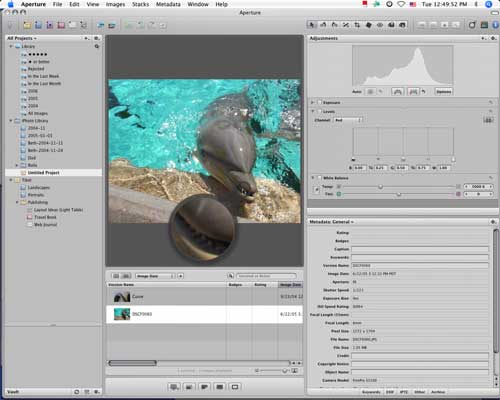
The main window is divided into three sections: a column of libraries, folders, vaults and projects on the left; a viewer window and browser in the center; and pods on the right containing metadata information, adjustments and filters.
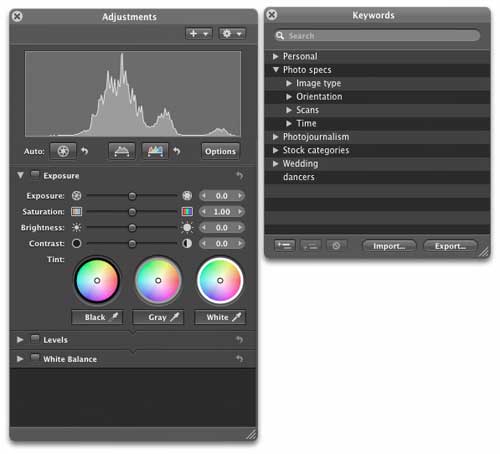
Beyond this basic layout, Aperture also offers a variety of other preset layouts for various purposes, and, of course, you can make adjustments to layouts to suit your needs--closing various panes and drawers to make more room for the main image viewer, for example. The panels themselves are not detachable from the main interface (meaning that you can't undock the panels so that they appear in their own floating windows). However, for some functions, a heads-up display is available, including for the Adjustments panel, which contains not only adjustments, but filters as well.
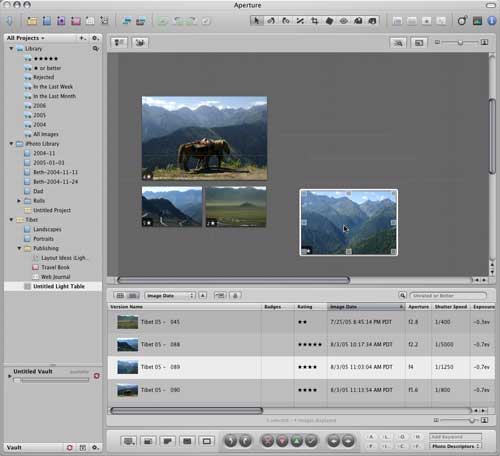
And, of course, there's also a special workspace element called "Light Table." In this window, you can drag and drop images from your various collections to arrange them to create layouts.
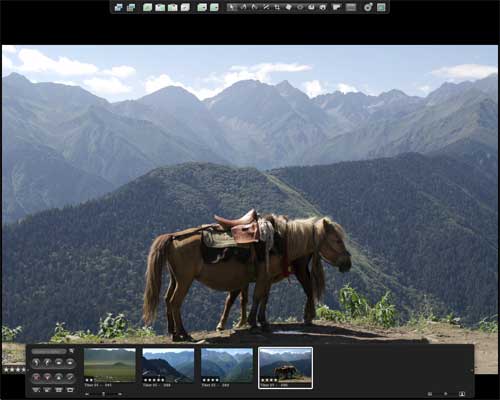
And there's a full-screen mode that you can toggle on and off with a single keystroke (F) to work in an environment with fewer distractions.
Related Sites: Creative Mac , Digital Producer , Audio Video Producer , Corporate Media News , Digital Media Designer , Oceania , MacDesignPro
Related Newsletter: DMN Newsletter , Pixels Newsletter , Mac Alert Newsletter , Digital Media Net , DMNForums , Review Seeker
To Comment on This Article, Click HERE
Most Recent Reader Comments:
Click Here To Read All Posts
Must be Registered to Respond (Free Registration!!!, CLICK HERE)
Digital favorites
- Casino Online Non Aams
- Betting Sites UK
- Casino UK Sites
- Casino Online Non Aams
- Casino Non Aams
- Casinos Not On Gamstop
- UK Online Casinos Not On Gamstop
- Meilleur Casino En Ligne
- Crypto Casinos
- Casino Online Italia
- Migliori Giochi Casino Online
- Meilleur Casino En Ligne Français
- Casino En Ligne
- Meilleur Casino En Ligne Francais
- Siti Scommesse Non Aams
- Siti Poker Online Migliori
- Meilleur Site De Poker
- Site De Paris Sportif Nouveau
- Sweet Bonanza Fruits Avis
- Parier Sur Ufc
- Fm카지노 가입코드
- 비트코인 스포츠베팅
- Casino Jeux En Ligne
- Sites De Paris Sportifs
- Casino En Ligne Argent Réel
- Cresus Casino Avis
- Migliore Casino Non Aams
- Meilleur Casino En Ligne
- Meilleur Casino En Ligne 2026
- Casino En Ligne Fiable
- Casino En Ligne
- Migliori Casino Crypto
- Bonus Free Spin Senza Deposito
- Casino Online Non Aams Sicuri
- Migliori Siti Scommesse Non Aams
- Meilleur Casino En Ligne De France
- Casino En Ligne
- Casino En Ligne Fiable
- Trusted Online Casino Malaysia
- Nouveau Casino En Ligne 2026
- オンラインポーカー
- Casino En Ligne Cashlib
Source:Digital Media Online.
All Rights Reserved


 (Rated by 42 users)


