 |
|
More Related Stories |
 |

From: $125  |
|
ACD Systems ACDSee Pro
In today's world of professional digital photograp...
From: $150 |
| Page (1) of 3 - 01/30/06 |
 email article email article |
 print
page print
page |
ACDSee Pro is an image management and photo editing application for Windows that gives digital photographers the tools to better manage their photography work flows. The strength with this application is in its photo management capabilities, although it does feature very robust image editing tools. Based largely on the ACDSee Photo Manager, ACDSee Pro adds several professional tools to the mix, including full RAW preview and editing support, visual tagging, tonal adjustment and lens correction tools. Within the scope of this first look, we'll discuss some of the features found in ACDSee Pro, starting with RAW support.
RAW
An important feature to ACDSee Pro is its support for RAW image files. The support isn't limited to viewing, rather ACDSee Pro offers very robust RAW editing tools, including a Levels editor, giving you the capability to adjust shadows, midtones, and highlights (via numeric value inputs or arrow keys), white balance adjustments (temperature, tint, saturation), as well as detail adjustments (sharpness, noise reduction). You can also save custom RAW presets to apply to other images.
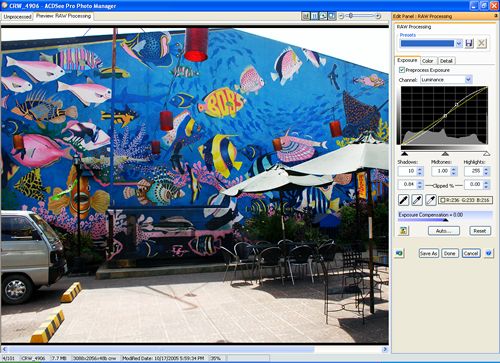 |
| RAW processing panel. |
Once you make your changes to the RAW file, you can save the file out as a JPEG OR TIFF file. You can also click done and ACDSee Pro will save the changed RAW settings to a database, leaving the original file. When you open the image again, the RAW settings previously applied will be reapplied to the image. ACDSee Pro supports RAW files from the following digital cameras and camera backs; Canon, Nikon, Fuji, Olympus, Konica Minolta, Pentax, Casio, Imacon, Kodak, Creo, Contax, Leica, Panasonic, Phase One, Sonar, and Sony.
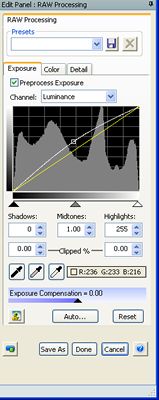 |
| RAW Processing panel |
View
ACDSee Pro supports more than 100 image file formats, including RAW, DNG, and TIFF. New features to ACDSee Pro include fast RAW image previews, the capability to sort images based on EXIF camera metadata and IPTC information, as well as a Histogram preview.
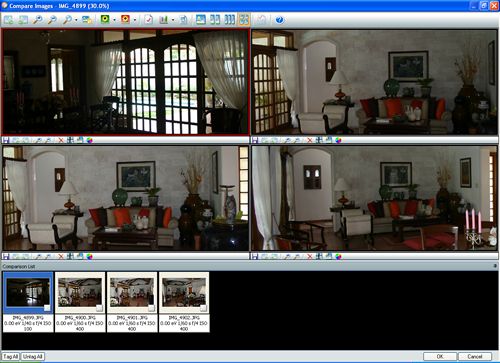 |
| Compare Image enables you to look at up to four images simultaneously. |
Also new is the Compare Image feature. Compare Image enables you to visually look at up to four images at the same time in the same window. With Compare images, you can zoom in and out of the images; Pan Lock the images so when you move one the others will move in tandem; check under and over exposure of the images; view image properties, which includes image size, date and time of capture, F-number, ISO speed rating, and exposure time; view the individual red, green, and blue levels, or view them together as a set; adjust the metadata viewing settings, and view the images one up, two up, three up or four up.
Related Newsletter: DMN Newsletter , CMN Newsletter , Pixels Newsletter , Digital Media Net , DMNForums , Review Seeker
To Comment on This Article, Click HERE
Most Recent Reader Comments:
Click Here To Read All Posts
Must be Registered to Respond (Free Registration!!!, CLICK HERE)
Digital favorites
- Casino Online Non Aams
- Betting Sites UK
- Casino UK Sites
- Casino Online Non Aams
- Casino Non Aams
- Casinos Not On Gamstop
- UK Online Casinos Not On Gamstop
- Meilleur Casino En Ligne
- Crypto Casinos
- Casino Online Italia
- Migliori Giochi Casino Online
- Meilleur Casino En Ligne Français
- Casino En Ligne
- Meilleur Casino En Ligne Francais
- Siti Scommesse Non Aams
- Siti Poker Online Migliori
- Meilleur Site De Poker
- Site De Paris Sportif Nouveau
- Sweet Bonanza Fruits Avis
- Parier Sur Ufc
- Fm카지노 가입코드
- 비트코인 스포츠베팅
- Casino Jeux En Ligne
- Sites De Paris Sportifs
- Casino En Ligne Argent Réel
- Cresus Casino Avis
- Migliore Casino Non Aams
- Meilleur Casino En Ligne
- Meilleur Casino En Ligne 2026
- Casino En Ligne Fiable
- Casino En Ligne
- Migliori Casino Crypto
- Bonus Free Spin Senza Deposito
- Casino Online Non Aams Sicuri
- Migliori Siti Scommesse Non Aams
- Meilleur Casino En Ligne De France
- Casino En Ligne
- Casino En Ligne Fiable
- Trusted Online Casino Malaysia
- Nouveau Casino En Ligne 2026
- オンラインポーカー
- Casino En Ligne Cashlib


