 |
|
More Related Stories |
 |
|
From: $38 to $45  |
|
TRACKER Boat Cloudburst Covers - '02 Pro Guide V-16 SC w/Port Trolling Motor O/B
Overton's - Tracker Boat Cloudburst Covers - '02 P...
From: $220 |
|
TRACKER Boat Sharkskin Covers - '02 Pro Guide V-16 SC w/Port Trolling Motor O/B
Overton's - Tracker Boat Sharkskin Covers - '02 Pr...
From: $255 |
| Page (1) of 1 - 02/08/06 |
 email article email article |
 print
page print
page |
Manufacturer: Razer Pro|Solutions (http://www.razerpro.com)
Platform: Mac OS X and Windows
Price: $59.99 for the Pro V1.6 mouse; $29.99 for the Pro Pad
Users: Graphic designers and others who require precision from their input devices
Recommendation: Buy
I'm not a huge fan of mice in general, preferring pressure-sensitive graphics tablets instead for the vast bulk of my work (something on the order of 95 percent of my work). When I do swap out my stylus for a mouse, the reason is invariably the need for absolute precision--masking out difficult images, working with paths, etc. But in this respect, even mice designed for "pro" users (as indicated by their marketing nomenclature) can fall woefully short of my needs.
The Razer Pro V1.6 from Razer Pro|Solutions is different from these inferior "pro" mice in at least three important respects: precision, utility and design. It is, in short, a "pro" mouse that lives up to its name.
Razer Pro V1.6 hardware
The first and most critical feature of this hardware for me is precision. There's no point in switching from my usual tablet to a mouse if I'm not going to get a benefit out of it for working with tools the require precision. The Razer Pro V1.6 mouse has a resolution of 1,600 DPI. Now, I've looked at other mice that have had that same resolution, and they've had other problems that negate the benefit of that. If the sensor is inaccurate, for example, you might experience cursor jumping when moving the mouse around or even some shaking of the cursor when the mouse is still. But the Razer Pro V1.6 does not have these negatives. It's precise, and it's smooth.
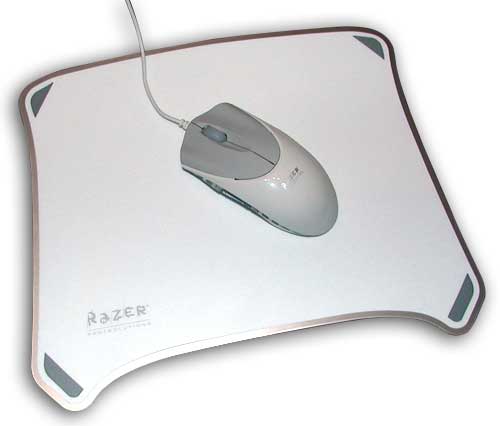
Incidentally, Razer also offers something called a "Pro Pad" (seen above), which is an aluminum mouse pad. It's reversible, offering two different hardened textures for your mousing pleasure. I didn't experience any difference in the precision of this mouse when using it on the Pro Pad, a bare keyboard tray or any of the other surfaces I tried. (This mouse even works with some degree of accuracy on a glass surface. Not that you'd want to do that on a regular basis, but you never know.) If you're interested in trying out the Pro Pad, it's available separately for $29.99.
Beyond its primary advertised feature (precision), the Razer Pro V1.6 offers some other advantages that both pros and consumers can appreciate. One of these is its wealth of buttons--seven in total, including the scroll wheel. All of these buttons are fully programmable, as we'll see below when we look at the software that drives the Razer pro V1.6.
Normally when I use mice with this many buttons, I invariably find that they're designed in a such a way as to make it difficult to handle the mouse without accidentally clicking the buttons. Not so with the Razer Pro V1.6. The buttons offer just enough resistance that they can be touched without accidentally being clicked, and the side buttons, which are usually the most problematic in terms of handling, are flush with the mouse's rubberized side grip. It's a bit hard to see in the image below, since the side buttons are transparent, and the whole side grip is illuminated (for whatever reason), but the side buttons themselves are single buttons, but you can apply pressure to either side, effectively giving you four side buttons.
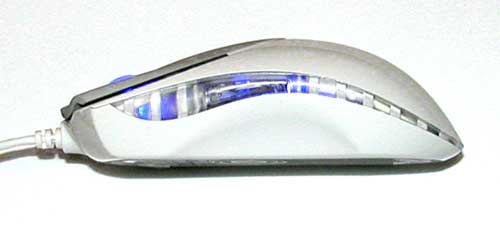
The overall design of the Razer Pro is excellent. It's a comfortable mouse--long and lean, with large, textured primary buttons; a large, illuminated rubber scroll wheel; and rubberized side rails. I found this mouse extremely comfortable to use. Some of you may prefer the enormous hump-backed mice out there, and I can understand that. Me, I prefer to leave my palm on the mousing surface for greater control, and this allows me to do that comfortably. The mouse is roughly 5 inches long, 2.5 inches wide and 1.5 inches high.
Also worth noting is that this mouse's cord is 7 feet long, giving you plenty of freedom in terms of the placement of your mouse.
Razer Pro V1.6 software
For software, the Razer Pro V1.6 ships with drivers for Mac OS X and Windows. In Mac OS X, controls for the mouse are provided via a System Preferences pane. This allows you to set the functions for each of the seven buttons on the mouse and orient the buttons for left- or right-hand use in a single click. Buttons can be assigned standard left-click and right-click functionality; keystrokes; double-clicks; macros; and on the fly mouse sensitivity adjustments. (If desired, sensitivity adjustments can be displayed on screen as you perform them.)
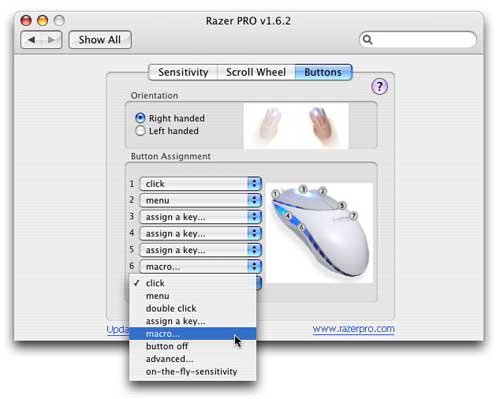
The great thing about the sensitivity adjustment is that it allows you to work slowly and precisely on a particular portion of your screen, but you can then easily switch the sensitivity to access menus, navigate, etc., without having to go back and change the sensitivity settings in System Preferences. Macro assignments can include up to eight button commands.
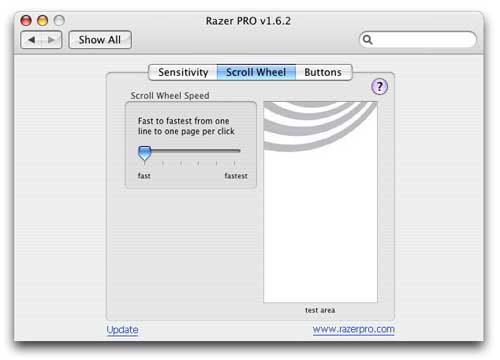
Scroll wheel settings are a bit more limited. You can set the speed of the scroll wheel anywhere from "fast" (which is about normal on any other mouse) to "fastest" (which will scroll through the Encyclopedia Britannica in about a half second). The scroll wheel is sensitive to acceleration, so the faster you scroll with it, the farther it scrolls with each movement. So, for example, even on the fastest setting, you can still scroll a half line at a time by moving the scroll wheel very slowly, or you can jump literally the equivalent of 150 "Page Down" commands with one short, quick motion.
And, finally, you can also set the sensitivity of the mouse itself. The Pro V1.6 software lets you assign a single sensitivity value or individual sensitivity values to the X and Y axes in the Advanced settings options. (In the Advanced settings, you can also set the Master Acceleration Control.)
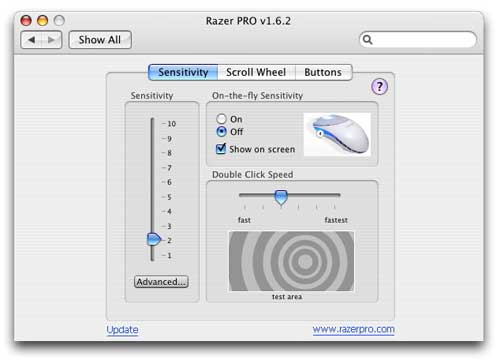
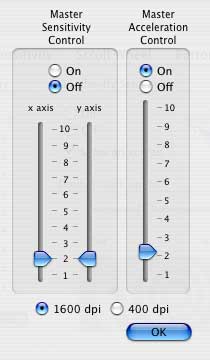
There are two negatives with the software that currently comes with the Pro V1.6. The first has to do with installation. The CD does include a Mac OS X installer, but it actually appears as a folder, rather than a package, so it can't be used. I had to download the driver software from Razer's Web site.
The second negative is that the button function assignments are fairly limited. You can't, for example, set a button to open a particular application (or template or whatever), and you can't assign functions according to the needs of your different applications. If you use several pro applications, you'd want to be able to access the shortcuts to those specific applications. But you can't with the current software. There are not "button sets," as you might see with a Wacom graphics tablet or a Contour shuttle/jog controller. This is functionality the Razer Pro V1.6 could use.
The bottom line
So, overall, I found the Razer Pro V1.6 an effective, accurate and comfortable mouse. At $60, the price might seem a bit steep, but I think it's worth it for a solid professional mouse like this. I give it a Buy recommendation.
The Razer pro V1.6 is available now for $59.99 for Mac OS X and Windows. The optional Razer Pro Pad is available separately for $29.99. For more information, visit http://www.razerpro.com.
 If you liked this article
click here to recommend it.
Page: 1
If you liked this article
click here to recommend it.
Page: 1
Related Sites: Creative Mac , Digital Producer , Audio Video Producer , Corporate Media News , Digital Media Designer , Oceania , MacDesignPro
Related Newsletter: DMN Newsletter , Pixels Newsletter , Mac Alert Newsletter , Digital Media Net , DMNForums , Review Seeker
To Comment on This Article, Click HERE
Most Recent Reader Comments:
Click Here To Read All Posts
Must be Registered to Respond (Free Registration!!!, CLICK HERE)
Digital favorites
- Casino Online Non Aams
- Betting Sites UK
- Casino UK Sites
- Casino Online Non Aams
- Casino Non Aams
- Casinos Not On Gamstop
- UK Online Casinos Not On Gamstop
- Meilleur Casino En Ligne
- Crypto Casinos
- Casino Online Italia
- Migliori Giochi Casino Online
- Meilleur Casino En Ligne Français
- Casino En Ligne
- Meilleur Casino En Ligne Francais
- Siti Scommesse Non Aams
- Siti Poker Online Migliori
- Meilleur Site De Poker
- Site De Paris Sportif Nouveau
- Sweet Bonanza Fruits Avis
- Parier Sur Ufc
- Fm카지노 가입코드
- 비트코인 스포츠베팅
- Casino Jeux En Ligne
- Sites De Paris Sportifs
- Casino En Ligne Argent Réel
- Cresus Casino Avis
- Migliore Casino Non Aams
- Meilleur Casino En Ligne
- Meilleur Casino En Ligne 2026
- Casino En Ligne Fiable
- Casino En Ligne
- Migliori Casino Crypto
- Bonus Free Spin Senza Deposito
- Casino Online Non Aams Sicuri
- Migliori Siti Scommesse Non Aams
- Meilleur Casino En Ligne De France
- Casino En Ligne
- Casino En Ligne Fiable
- Trusted Online Casino Malaysia
- Nouveau Casino En Ligne 2026
- オンラインポーカー
- Casino En Ligne Cashlib
Source:Digital Media Online.
All Rights Reserved


 (Rated by 7 users)


