 |
|
More Related Stories |
 |

From: $623 to $1,251  |
|
ADOBE LA FULL AFTER EFFECTS PB 7 MAC RETAIL ENG 1U
Animate your ideas.
From: $635 to $1,251 |
|
Adobe AFTER EFFECTS STD 7 WIN UPG ENG STD-STD 1U
The industry standard for motion graphics and visu...
From: $176 to $246 |
| Page (1) of 1 - 05/10/06 |
 email article email article |
 print
page print
page |
 As an After Effects user and CINEMA 4D user, I note that there are many similarities between the programs. Unfortunately their naming conventions are different. In this short series of tips, I'll try to make a connection to C4D from AE.
 As an After Effects user and CINEMA 4D user, I note that there are many similarities between the programs. Unfortunately their naming conventions are different. In this short series of tips, I'll try to make a connection to C4D from AE. With the new releases of CINEMA 4D, it is even easier for Adobe After Effects users to create their own 3D animations and incorporate them into their composites and animations.
This isn't a basics primer. Instead, it's just a "heads up" when you want to find something in CINEMA 4D that you're already familiar with in Adobe's After Effects.
-----------
In Adobe After Effects (AE), the Timeline contains the playhead control, allowing you to scrub through the animation AND see the keyframes at the same time. You can either work in a 2D composition, or a 3D composition, with varying parameters on simple transformation tools or effects.

In CINEMA 4D (C4D), the Timeline is much more detailed. For that reason, it requires its own window. (see below). However, you can still control the playhead, and navigate through the animation by dragging the playhead icon in the Animation Toolbar.

In AE, once you click the stopwatch, creating a keyframe, every time you modify that particular parameter, a new keyframe is made, or an existing keyframe is edited.

In C4D, there are so many editable definitions to any object, the timeline may seem a little daunting when converting from AE, but a look at the MAXON tutorial for the timeline makes short work of it. In this AE-C4D note, I wanted to put a note on making simple animation to get you started.
With your 3D geometry built, let's take a look at the play window options and icons in the Animation Toolbar.
1. Playhead and Region of Duration of Project
2. Navigation Buttons
3. Sound
4. Set Keyframe
5. Automatic Keyframe
6. Selection Object
7. Position / Scale / Rotation / Parameter / PLA (point level animation) record keys
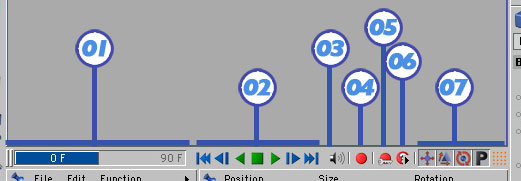
Obviously, C4D deals with 3D geometry, so most of the parameters, especially all of the transformation parameters, have 3 values each. With a specific object or objects selected, you'll notice that there is a window that opens containing all of the Attributes for that geometry. You'll also notice that there is a small open circle graphic next to each parameter.
1. If the small circle is open = No Animation for that Parameter
2. If the small circle is filled red = Animation for that Parameter; Keyframe at that specific frame in time.
3. If the small circle is open red = Animation for that Parameter; no keyframe at that specific frame in time.
Option-Click any of those open circles to create a keyframe at that point in time.

This could be difficult for someone who is used to AE's automatic keyframing. Instead of animating each one individually, turning on the Automatic Keyframe icon, you'll see all of the "keyframable" / "animatable" parameters (they turn red).


That's it for now.
If you have any questions, would like to see more tutorials like this, or have specific requests, be sure to post them to the forums.
Be sure to visit the MAXON CHANNEL and the AFTER EFFECTS CHANNEL for more tips and tricks like these.
Coming soon, check out resources on MAXON's website.
 If you liked this article
click here to recommend it.
Page: 1
If you liked this article
click here to recommend it.
Page: 1
 Ko Maruyama is a freelance animator in Los Angeles. In addition to working on film and broadcast animations, Ko teaches at Pasadena's Art Center College of Design - focusing on motion design. When working, writing or testing software allows, you can find him lending a hand in the After Effects board and lurking among the Cinema4D, Visual Effects and Photoshop posts within the DMNForums.
Related Sites: Creative Mac , Digital Producer , Digital Animators , Animation Artist , Siggraph News , Digital Media Designer , Oceania , MacAnimationPro , MacDesignPro , After Effects , Maxon
Related Newsletter: DMN Newsletter , Pixels Newsletter , Mac Alert Newsletter , Renders , Digital Media Net , DMNForums , Tutorial Finder
To Comment on This Article, Click HERE
Most Recent Reader Comments:
Click Here To Read All Posts
Must be Registered to Respond (Free Registration!!!, CLICK HERE)
Digital favorites
- Casino Online Non Aams
- Betting Sites UK
- Casino UK Sites
- Casino Online Non Aams
- Casino Non Aams
- Casinos Not On Gamstop
- UK Online Casinos Not On Gamstop
- Meilleur Casino En Ligne
- Crypto Casinos
- Casino Online Italia
- Migliori Giochi Casino Online
- Meilleur Casino En Ligne Français
- Casino En Ligne
- Meilleur Casino En Ligne Francais
- Siti Scommesse Non Aams
- Siti Poker Online Migliori
- Meilleur Site De Poker
- Site De Paris Sportif Nouveau
- Sweet Bonanza Fruits Avis
- Parier Sur Ufc
- Fm카지노 가입코드
- 비트코인 스포츠베팅
- Casino Jeux En Ligne
- Sites De Paris Sportifs
- Casino En Ligne Argent Réel
- Cresus Casino Avis
- Migliore Casino Non Aams
- Meilleur Casino En Ligne
- Meilleur Casino En Ligne 2026
- Casino En Ligne Fiable
- Casino En Ligne
- Migliori Casino Crypto
- Bonus Free Spin Senza Deposito
- Casino Online Non Aams Sicuri
- Migliori Siti Scommesse Non Aams
- Meilleur Casino En Ligne De France
- Casino En Ligne
- Casino En Ligne Fiable
- Trusted Online Casino Malaysia
- Nouveau Casino En Ligne 2026
- オンラインポーカー
- Casino En Ligne Cashlib
Source:Ko Maruyama.
All Rights Reserved


