 |
|
More Related Stories |
 |

From: $70  |
|
INTERVIDEO MEDIAONE GALLERY BY INTERVIDEO
1116133 BWMD2P10092001000 INTERVIDEO MEDIAONE GALL...
From: $56 |
| Page (1) of 1 - 06/14/06 |
 email article email article |
 print
page print
page |
InterVideo MediaOne Gallery enables you to organize and share your media files. The application, priced at $49.95, takes a visual approach to photo and video files, icon based look at documents such as Word or PDFs, and a song name, artist, duration, album, and location look of music files. When you launch the application it prompts you with two choices, to scan the entire hard drive to look for media files, or to scan selected folders on the hard drive. Scanning the entire hard drive might get a better result, but it'll also inevitably pick up some of the larger sample files that come with many media creation applications, essentially cataloging files that might not need to be cataloged.
If users would adhere to the My Documents folder provided by Windows XP, the scan process would be faster. Before you perform a scan, you can select if you want Gallery to scan once, or scan and monitor for changes. You can also specify what type of files you want Gallery to scan for, as well as what folders you want Gallery to scan. The image file types supported by Gallery include JPG, PNG, BMP, PCX, TIF, GIF, and TGA. Video file type support includes MPEG, ASF, WMV, AVI, QuickTime, and DVR-MS. Supported audio file types include MP3, WAV, and WMA, and supported document file types include DOC, XLS, PPT, MDB, MPP, VSD, TXT, and PDF. When importing files, you can also limit the size of the files being imported. You can set a minimum image and video size by width and height, and a minimum audio length.
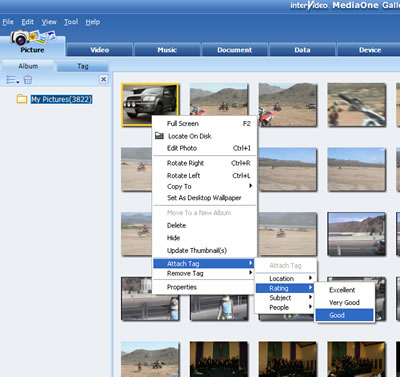 |
| You can tag your files and give them a rating. |
Once the scan process is complete, you can view all your files from within the Gallery. The Gallery is comprised of seven tabs in which the media files are organized. The tabs include Picture, Video, Music, Document, Data, Device, and Internet.
From the Picture tab you can view all the images that Gallery located during the initial scan in thumbnail form. Double click on an image and it shows in a larger view. There is also a Tag tab that enables you to assign tags to images in a variety of ways. This includes location, rating, subject, and people. You can also create custom tags. Tags are applied to images by right clicking on the image in the Album and then selecting which tag you wish to add to the image.
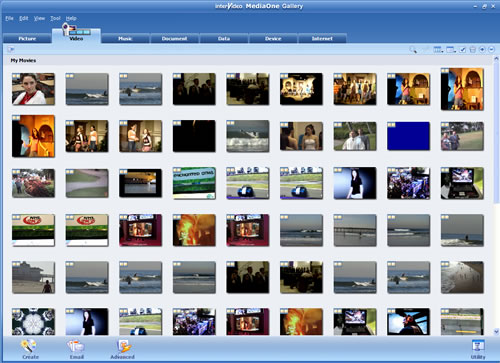 |
| Videos can be played in the included InterVideo video player |
From the picture tab you can also burn DVDs, print, email, create enhanced CDs, mixed mode CDs, MPV discs, High Mat Discs, a bootable disc, and a web page of the images. The Video Tab operates similarly. From the Video Tab, Gallery shows all the videos it has scanned on the hard drive in thumbnail form. Clicking on a video will enable you to play it in the InterVideo player. The Video Tab enables you to split video clips as well as take snapshots of the scenes in the clips.
In addition to enabling you to play your music files, the Music Tab offers all the information related to each track in your music library, including, name of song, artist, duration, album name, and location of the song. Like other similar applications, you can create CDs of your songs in the MP3 file format, Windows Media Audio format, as well as WAV format. You can also create a data disc of your music as well, which can serve as a backup.
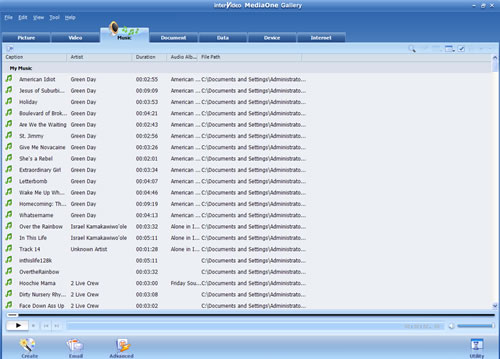 |
| Music tab looks familiar |
The Document Tab is a handy tool for locating lost documents, be they Microsoft Word files, Adobe PDFs, or even text files. The Document Tab lists the documents by file name and includes the file size, date created, and location. You can sort the documents by group, file name, time, file size, date modified, and resolution. As with the other media tabs, you can tag documents in the same fashion. The Data tab is just like Windows Explorer in that you can access the files on your hard drive. Nothing big here, although you can create data discs, enhanced CDs, mixed mode CDs, and the like from here as well. the Device Tab displays any media devices connected to the computer, devices such as digital cameras, web cams, DV camcorders, and the like. It will also display audio CDs and DVD titles residing in the CD/DVD player. The Internet Tab is just that. It is a browser that connects you to the Web. You might find it ideal if you subscribe to one of the many content upload sites on the Web, but for the most part, it just duplicates what you already have on the computer.
First Impressions
The redundancy with media management tools such as MediaOne Gallery is that most of the functionality in these types of apps is already duplicated elsewhere in other tools that you probably already have installed on your computer, especially if you have a digital camera, download or even play music, or view and manipulate video. And chances are, if your computer is current, you have a CD/DVD burner and the application that enables you to burn discs. What MediaOne Gallery does is put it all together in a unified interface. The $49 question is do you want to have it all in a unified location or would you rather use the dedicated applications that you probably already have? I did find a useful feature, and that was the capability to delete media files that were no longer needed. It performed very well. For me, I would save my money and put it elsewhere. But you might disagree. And if you do, please download the trial version at InterVideo's website.
 If you liked this article
click here to recommend it.
Page: 1
If you liked this article
click here to recommend it.
Page: 1
Related Sites: Digital Producer , Audio Video Producer , Corporate Media News , Digital Media Designer , Oceania , Consumer Electronics Net , HomeOffice (CE)
Related Newsletter: DMN Newsletter , CMN Newsletter , Pixels Newsletter , Digital Media Net , DMNForums , Gadgets Newsletter , Tutorial Finder , Review Seeker
To Comment on This Article, Click HERE
Most Recent Reader Comments:
Click Here To Read All Posts
Must be Registered to Respond (Free Registration!!!, CLICK HERE)
Digital favorites
- Casino Online Non Aams
- Betting Sites UK
- Casino UK Sites
- Casino Online Non Aams
- Casino Non Aams
- Casinos Not On Gamstop
- UK Online Casinos Not On Gamstop
- Meilleur Casino En Ligne
- Crypto Casinos
- Casino Online Italia
- Migliori Giochi Casino Online
- Meilleur Casino En Ligne Français
- Casino En Ligne
- Meilleur Casino En Ligne Francais
- Siti Scommesse Non Aams
- Siti Poker Online Migliori
- Meilleur Site De Poker
- Site De Paris Sportif Nouveau
- Sweet Bonanza Fruits Avis
- Parier Sur Ufc
- Fm카지노 가입코드
- 비트코인 스포츠베팅
- Casino Jeux En Ligne
- Sites De Paris Sportifs
- Casino En Ligne Argent Réel
- Cresus Casino Avis
- Migliore Casino Non Aams
- Meilleur Casino En Ligne
- Meilleur Casino En Ligne 2026
- Casino En Ligne Fiable
- Casino En Ligne
- Migliori Casino Crypto
- Bonus Free Spin Senza Deposito
- Casino Online Non Aams Sicuri
- Migliori Siti Scommesse Non Aams
- Meilleur Casino En Ligne De France
- Casino En Ligne
- Casino En Ligne Fiable
- Trusted Online Casino Malaysia
- Nouveau Casino En Ligne 2026
- オンラインポーカー
- Casino En Ligne Cashlib


 (Rated by 7 users)


