 |
|
More Related Stories |
 |

From: $289 to $309  |
|
Adobe Photoshop Elements 4.0 for Windows
Adobe Photoshop Elements 4.0 software combines pow...
From: $35 to $100 |
|
Adobe Photoshop Elements 3.0 Software - Windows.
Adobe Photoshop Elements 3.0 Software
From: $36 to $60 |
| Page (1) of 1 - 09/22/06 |
 email article email article |
 print
page print
page |
 Many people know modo. What some don't know is that the company who makes the premiere 3D software is called Luxology. In addition to the 3D modeling, animation and paint software that Luxology has created, they are now offering a new tool called "imageSynth" which works within Photoshop.
You don't need to have modo, or even be a 3D artist to appreciate the new Photoshop plugin from Luxology. Fueled by amazingly strong math formulae developed by Allegorithmic, imageSynth makes perfectly tiled images that can be used as backgrounds, material maps, or just about anything that a tiled image can be implemented.
Unlike Photoshop's packaged "pattern maker", this plugin produces a true tile. (see bottom of page*)
Here's how it works:
1. You'll need to have an image that you want to use as a tiling reference. Within that image, you can set up multiple bitmap areas called "chunks". More on that in a couple of steps.
I have cropped and saved this image of the mountain goat head. You can download it here:
2. Create a new Photoshop document that will define the size of your seamless texture. I'll make one at 1024x1024.
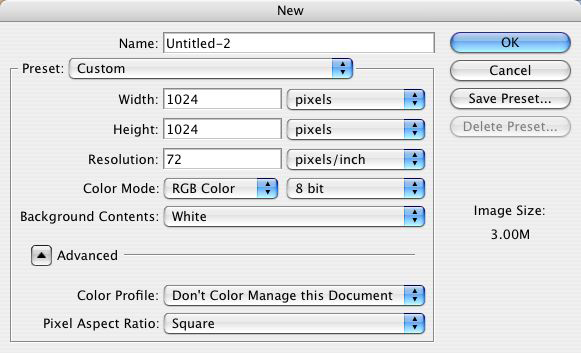
3. Run imageSynth (under Filters). The bigger your tiled image is, the more screen real estate you'll need. In order to zoom out on your texture window, use the CTRL-click contextual menu to allow the texture to fit. (You can use right click)


4. Add your input image. (If you notice soon enough, there will be a flashing prompt telling you to start in the left corner). This will create the first input image. It will also assign the first chunk, and show you the current chunk in the preview window.
At this point, you can start the tiling process by clicking the button in the Automation section.... or...
5. Modify Chunk options.
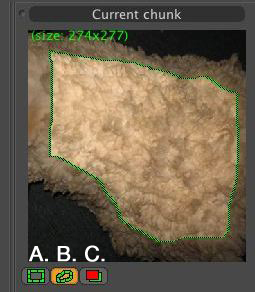
A. Use the rectangular marquee that creates a range of pixels to be used from the chunk. (!! Hold down the shift key to add selection to the current chunk !!)
B. Use the inner freehand marquee to create range of pixels in an irregular shape.
C. Use the mask tool to isolate any bitmap data that MUST be used in your tile.
At this point, you can start the tiling process by clicking the button in the Automation selection.... or...
6. Position your mouse over the tile window to manually.

Click "Apply" to render it to your Photoshop document.
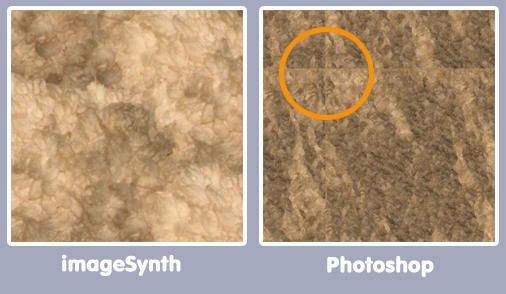
Here's a cropped version of the result versus Photoshop's pattern maker. Notice that imageSynth was able to keep the puffy clumps of wool. Photoshop turned it into long threads, and failed to tile around the edge of the frame:
When you purchase modo 202, you get imageSynth for free. Not into 3D? You can purchase a copy of the stand-alone version of imageSynth for only $99. To see more, check out the website at www.luxology.com.
 If you liked this article
click here to recommend it.
Page: 1
If you liked this article
click here to recommend it.
Page: 1
 Ko Maruyama is a freelance animator in Los Angeles. In addition to working on film and broadcast animations, Ko teaches at Pasadena's Art Center College of Design - focusing on motion design. When working, writing or testing software allows, you can find him lending a hand in the After Effects board and lurking among the Cinema4D, Visual Effects and Photoshop posts within the DMNForums.
Related Sites: Creative Mac , Digital Producer , Digital Animators , Animation Artist , Siggraph News , Digital Game Developer , Digital Media Designer , Oceania , MacAnimationPro , MacDesignPro , PhotoShop
Related Newsletter: DMN Newsletter , Pixels Newsletter , Levels Newsletter , Mac Alert Newsletter , Renders , Digital Media Net , DMNForums , Tutorial Finder
To Comment on This Article, Click HERE
Most Recent Reader Comments:
Click Here To Read All Posts
Must be Registered to Respond (Free Registration!!!, CLICK HERE)
Digital favorites
- Casino Online Non Aams
- Betting Sites UK
- Casino UK Sites
- Casino Online Non Aams
- Casino Non Aams
- Casinos Not On Gamstop
- UK Online Casinos Not On Gamstop
- Meilleur Casino En Ligne
- Crypto Casinos
- Casino Online Italia
- Migliori Giochi Casino Online
- Meilleur Casino En Ligne Français
- Casino En Ligne
- Meilleur Casino En Ligne Francais
- Siti Scommesse Non Aams
- Siti Poker Online Migliori
- Meilleur Site De Poker
- Site De Paris Sportif Nouveau
- Sweet Bonanza Fruits Avis
- Parier Sur Ufc
- Fm카지노 가입코드
- 비트코인 스포츠베팅
- Casino Jeux En Ligne
- Sites De Paris Sportifs
- Casino En Ligne Argent Réel
- Cresus Casino Avis
- Migliore Casino Non Aams
- Meilleur Casino En Ligne
- Meilleur Casino En Ligne 2026
- Casino En Ligne Fiable
- Casino En Ligne
- Migliori Casino Crypto
- Bonus Free Spin Senza Deposito
- Casino Online Non Aams Sicuri
- Migliori Siti Scommesse Non Aams
- Meilleur Casino En Ligne De France
- Casino En Ligne
- Casino En Ligne Fiable
- Trusted Online Casino Malaysia
- Nouveau Casino En Ligne 2026
- オンラインポーカー
- Casino En Ligne Cashlib
Source:Ko Maruyama.
All Rights Reserved


