 |
|
More Related Stories |
| Page (1) of 1 - 08/24/06 |
 email article email article |
 print
page print
page |
The generators
The basic concept of these generators is that they use multiple built-in functions in Photoshop to create unique textures at any resolution, regardless of the shape or size of the document in which you're creating the texture. Then you can generate the textures yourself, define them as patterns (if desired) and continue working with them in your composition or use them as displacement maps, as I outlined in a previous tutorial, which you can read by clicking here.
This new collection includes 15 such automated generators, each one designed to produce a slightly different effect, ranging from wrinkled and creased paper to general rough textures. Furthermore, each time you run one, it will generate a completely new texture for you. So really there are infinite variations here, and each one you create will be unique to you.
This collection is designed with displacement effects in mind, meaning that you generate the texture and then use that as the basis for displacing another image, thus transferring a quasi-3D texture effect to the image. (Incidentally, this is the third set of displacement elements that I've provided for download, and hence the name "Nagel Series 3.") Though these are designed for displacement, they can also be used for generating texture backgrounds as well. Most of these generators produce grayscale textures, but you can simply go in and colorize them using Hue/Saturation, if desired. Some also automatically generate Hue/Saturation and Brightness/Contrast adjustment layers to make this process even simpler for you.
I'll discuss how to install and use these generators below. First, here are 10 small examples showing off some of the generators composited in with other elements. (Look closely. You may find an important hidden message in these pictures!)
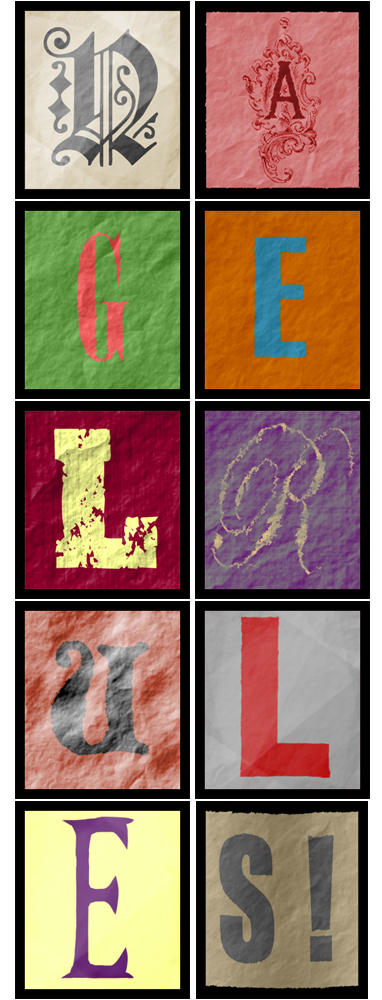
All set to download?
Read on for instructions.
Download, installation and usage
As usual, this week's collection is available free of charge for use in both commercial and non-commercial projects. But I am interested in how these elements are being used, so please drop me a line at [email protected] with any information you can provide on how you're using them and where I might see examples.
This download consists of a single .atn file, which is an "Action" file for Photoshop. It is compatible with Adobe Photoshop CS and CS2 on both Macintosh and Windows systems. It may also be compatible with prior versions, though I haven't tested this.
To download this latest collection displacement maps (NagelSeries3.atn), follow the download link below.
Download: Nagel Series 3 (texture generators) (4 KB zip archive)
Once you download the file (NagelSeries3.zip), decompress it. You will then have a ffile called NagelSeries3.atn. This file does not need to be placed in any particular location on your hard drive. Just stick it somewhere out of the way.
Once you've downloaded and decompressed the file, launch Photoshop. Open up the Actions window. In the top right of the Actions palette, click on the flyaway menu, and choose "Load Actions" from the list of available options. In the dialog that pops up, select NagelSeries3.atn.
You will then see these actions listed in the Actions palette.
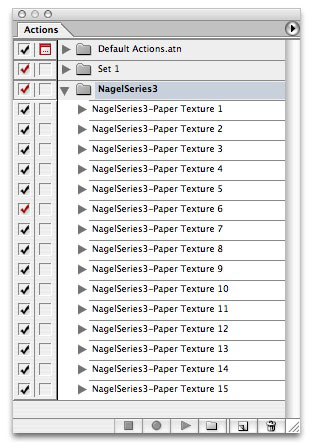
To use them, create a new document (or a new layer within your current document, if desired). Select one of the actions, and click the Play button at the bottom of the Actions palette. You'll then see the texture generated before your eyes.
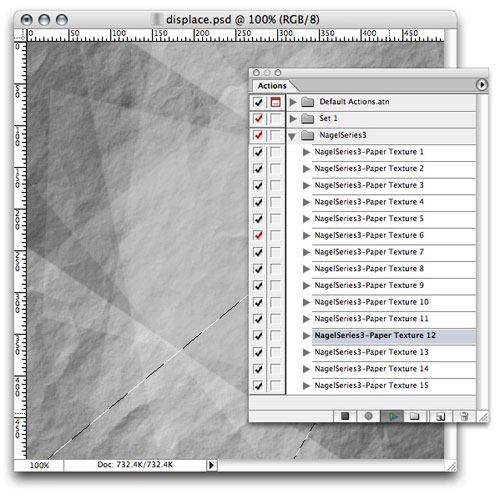
Note that every one of these generators will completely replace the contents of the currently selected layer, so make sure you're not going to destroy any of your valuable work. As I say, run these only in a new document or on a new layer within an existing document.
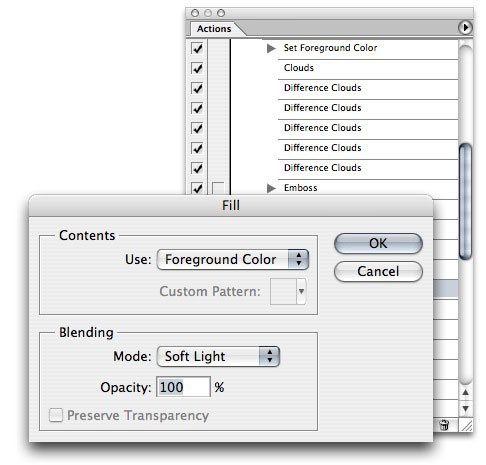
You can also customize these generators to suit your needs. To do this, expand the action you want to modify, then double-click on any step within the action. For example, I'll double-click the Fill step in the action below.
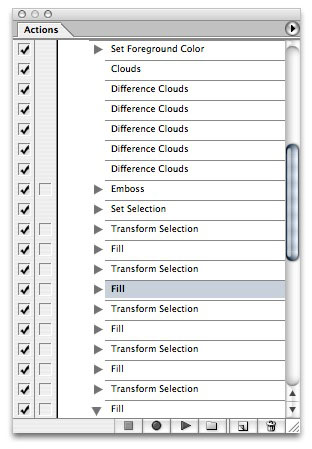
This will call up the Fill dialog, allowing me to change the color or blending mode so that I can make my own variations. Yu can do this with just about any step in any of these actions, so go nuts with them. Not that doing this sort of thing will permanently alter the action you modify, so you might want to duplicate the action first and then modify the copied version.
Okay, so that's it. Remember, if you'd like to find more of our free downloads, you can locate them by clicking on the links below.
- More Downloads for Photoshop
- All Free Downloads
 If you liked this article
click here to recommend it.
Page: 1
If you liked this article
click here to recommend it.
Page: 1
Related Sites: Creative Mac , Digital Producer , Audio Video Producer , Corporate Media News , Digital Media Designer , Oceania , MacDesignPro
Related Newsletter: DMN Newsletter , Pixels Newsletter , Mac Alert Newsletter , Digital Media Net , DMNForums
To Comment on This Article, Click HERE
Most Recent Reader Comments:
Click Here To Read All Posts
Must be Registered to Respond (Free Registration!!!, CLICK HERE)
Digital favorites
- Casino Online Non Aams
- Betting Sites UK
- Casino UK Sites
- Casino Online Non Aams
- Casino Non Aams
- Casinos Not On Gamstop
- UK Online Casinos Not On Gamstop
- Meilleur Casino En Ligne
- Crypto Casinos
- Casino Online Italia
- Migliori Giochi Casino Online
- Meilleur Casino En Ligne Français
- Casino En Ligne
- Meilleur Casino En Ligne Francais
- Siti Scommesse Non Aams
- Siti Poker Online Migliori
- Meilleur Site De Poker
- Site De Paris Sportif Nouveau
- Sweet Bonanza Fruits Avis
- Parier Sur Ufc
- Fm카지노 가입코드
- 비트코인 스포츠베팅
- Casino Jeux En Ligne
- Sites De Paris Sportifs
- Casino En Ligne Argent Réel
- Cresus Casino Avis
- Migliore Casino Non Aams
- Meilleur Casino En Ligne
- Meilleur Casino En Ligne 2026
- Casino En Ligne Fiable
- Casino En Ligne
- Migliori Casino Crypto
- Bonus Free Spin Senza Deposito
- Casino Online Non Aams Sicuri
- Migliori Siti Scommesse Non Aams
- Meilleur Casino En Ligne De France
- Casino En Ligne
- Casino En Ligne Fiable
- Trusted Online Casino Malaysia
- Nouveau Casino En Ligne 2026
- オンラインポーカー
- Casino En Ligne Cashlib
Source:Digital Media Online.
All Rights Reserved


 (Rated by 49 users)


